Home › Guides › Google Ads location targeting mistake
The Google Ads location targeting mistake that cut my ROAS in half
To scale a profitable clinic campaign, I excluded a handful of underperforming cities so spend would concentrate on the cheaper ones. Instead, cost per lead jumped over 50%, top keywords stopped serving, and ROAS fell from 3.5x to 1.4x. Removing every exclusion and restoring full targeting brought it back. The takeaway: in Google Ads location targeting is a signal source, so trim weak areas with bid adjustments, not hard exclusions.
For two months this was one of my best accounts. An aesthetic clinic here in Dubai, running Google Search, sitting at a healthy 3.5x ROAS in June and July, with cost per lead falling around 10% every month. Everything pointed one way: scale it. So I read the data, found the weak spots, and made one confident change to push efficiency further. That single change to my Google Ads location targeting dragged the account down to a 1.4x ROAS. Here is exactly what happened, and what I do differently now.
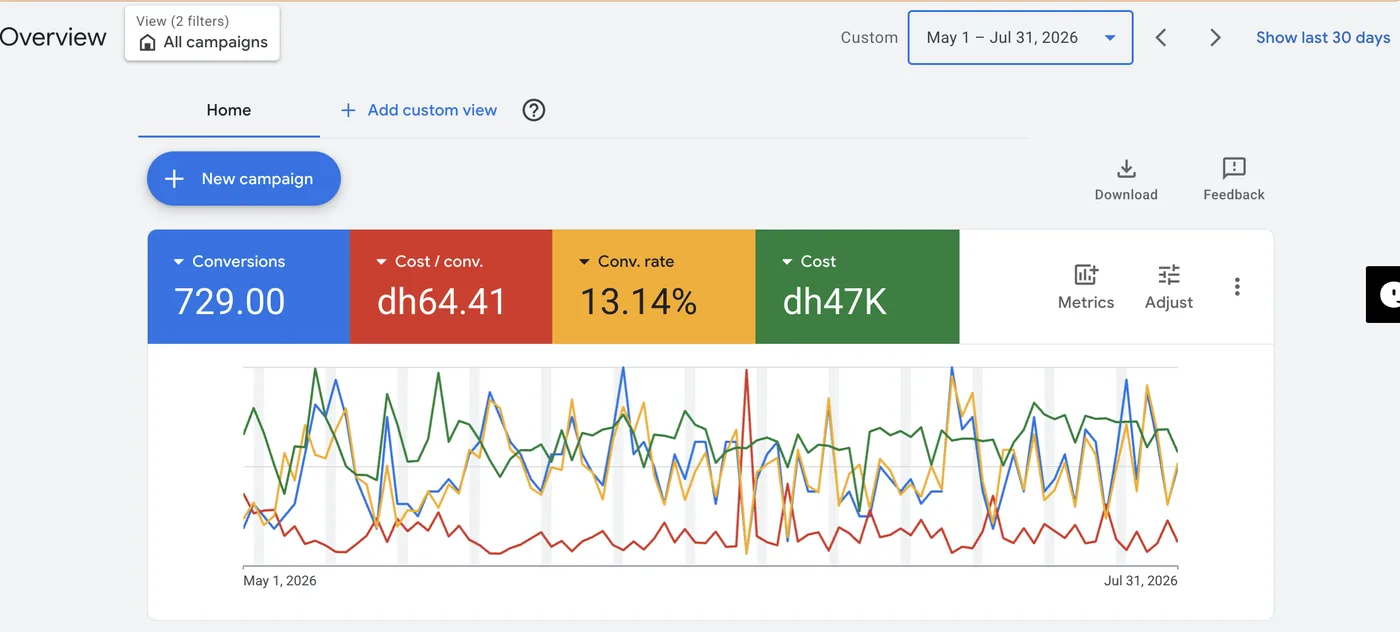
1. The optimisation that looked smart
Scaling a winner is meant to be simple: do more of what works, less of what does not. I opened the location report and found a small group of areas with high CPL and high CPC that were dragging the blended numbers down. The logic felt obvious. Exclude those areas, and the algorithm will pour budget into the cheaper, higher converting cities. Cleaner spend, better average, more profit. I added the exclusions and waited for the numbers to improve.
2. What actually happened after excluding locations
The opposite of the plan. Within days cost per lead spiked more than 50%. Conversion rate dropped, impression share fell, and lost impression share to both rank and budget climbed. Worse, several of my best service keywords simply stopped serving. CPL in areas that had been profitable at 50 to 60 AED climbed to around 90 AED. It was a domino effect: one restriction starved the campaign, and by month end the whole account had slipped to a 1.4x ROAS, well below break even.
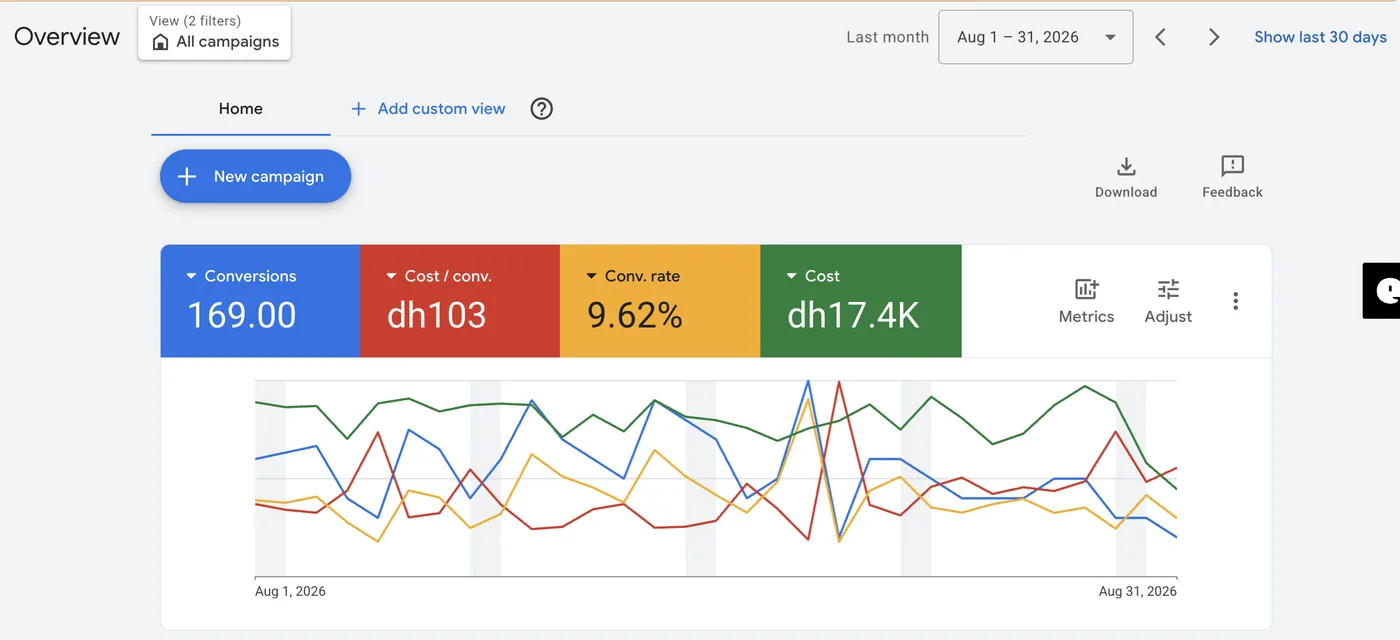
3. Why excluding locations broke the campaign
Google's Smart Bidding does not work in isolated boxes. It reads signals across the whole campaign: geography, device, time of day, audience, query. When I cut out locations, I did not just remove weak areas, I removed data the bidding model was using to make every other decision. With fewer signals it grew less confident, pulled back on impression share, and stopped serving keywords it had happily served the week before. The weak areas were never the real problem. Cutting them was.
4. The fix, and the recovery
I reversed it. Every location exclusion came out, full city targeting went back on, and I left the campaign to relearn without touching anything else. It took a couple of weeks. By 20 September cost per lead was down 15 to 20% from the peak, and the account produced 24,000 AED in sales against 7,700 AED in spend, roughly the return I had before I ever touched the locations.
5. What I do now instead of excluding locations
I still act on weak geography, just not with a hammer. Three rules I follow on every account now:
- Use location bid adjustments, not exclusions. Lower bids by 20 to 40% in weak areas so the algorithm keeps the data and the reach.
- Give Smart Bidding room to work. Sudden targeting cuts reset the learning phase and cost you weeks of stability.
- Exclude only with proof. Fully cut an area only when it has real volume and near zero conversions over a long window, never after a short, expensive streak.
This lesson cost me a month of profit and taught me something I now check on every account: in Google Ads, location targeting is a signal source, not just a spend filter. Restrict it carelessly and you starve the system that was making you money.
Frequently asked questions
Should I exclude underperforming locations in Google Ads?+
Why did my cost per lead go up after excluding locations?+
How do I recover a campaign that dropped after a targeting change?+
Related
Want a second pair of eyes on your Google Ads account?
Book a free 1:1 consultation. I'll show you where your account is overpaying and which "optimisations" are quietly costing you money.